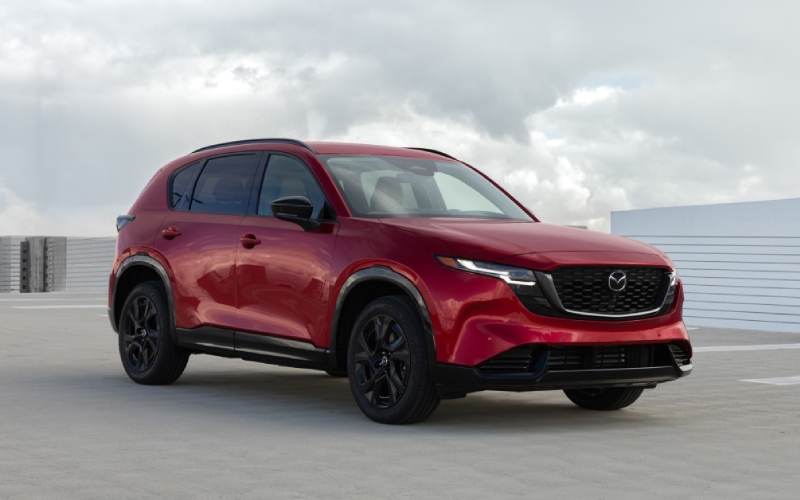
Roger Beasley Mazda Georgetown - Google built-in in the 2026 Mazda CX-5 makes Georgetown, TX driving feel effortless
The 2026 Mazda CX-5 brings the kind of seamless technology that actually simplifies life on the road. At the center is an available 15.6-inch integrated touchscreen with Google built-in — a big, bright interface that’s as familiar as your smartphone but optimized for glanceable, in-car use. If you spend time weaving through Georgetown traffic or merging onto I-35, this system is designed to keep you informed, oriented, and focused on the drive.
Because the software is built right into the SUV, Google Maps feels native — no juggling devices or relying on a cell signal from your phone. You’ll see real-time traffic, alternate routes, and saved places the moment you sign in with your Google Account. It’s easy to search by business name (say, a local coffee spot off Williams Drive), tap to navigate, and let the display’s crisp graphics and clear prompts guide your next turn. And since the layout acts like a smartphone home screen, you can pin favorites and reorder tiles so the features you use most are always close at hand.
Why the CX-5’s interface pairs so well with daily driving
Local driving throws a lot at you — construction detours, quick lane merges, unpredictable traffic near Wolf Ranch Town Center. The CX-5’s large-format screen, smooth animations, and logical menus make it easy to get answers fast without digging into submenus. Voice control is another major plus. As support for Google’s generative assistant rolls out to compatible vehicles, you’ll be able to ask more natural questions and refine requests with follow-ups. That means less memorizing commands and more speaking like you normally do, whether you’re searching for “parking near the courthouse” or “best route to avoid Mopac backups.”
Another advantage is the curated selection of in-vehicle compatible apps via Google Play. From music and podcasts to news briefings, you get the content you want in formats designed for the car — not just blown-up phone apps that can be awkward to use. Combined with the CX-5’s quiet cabin and available premium audio, it turns a routine Georgetown commute into a more enjoyable part of your day.
Set up is simple — and stays in sync
Getting the most from Google built-in doesn’t take a tech manual. Sign in once with your Google Account, and your saved places (home, work, frequent stops) follow you into the CX-5. That familiarity shortens your learning curve and helps you get right to driving. Prefer a specific map view or quick-access shortcuts? Customize your home screen so the things you use most are exactly where you expect them.
Open the main display and select the Google sign-in prompt.
Enter your credentials and confirm two-factor authentication if prompted.
Sync or add saved places, then pin your favorites to the home screen.
Adjust display layout and audio settings to your liking.
Once configured, the system feels like an extension of your regular digital life — only optimized for the road. Updates also allow new features and refinements to arrive over time, so the tech can grow with your needs.
Practical benefits you’ll appreciate around Georgetown
- Real-time routing: Proactive traffic updates for faster detours across town
- Clear visuals: A wide, high-resolution canvas that’s easy to read at a glance
- Natural voice: Ask for routes, places, or adjustments without memorizing commands
- Curated apps: In-vehicle compatible apps designed for safer, simpler use
- Personalization: Profiles, saved places, and settings that feel tailored to you
It all comes together in a way that complements Mazda’s driver-first philosophy. The display is positioned to minimize distraction; the software responds quickly; the features you need are close at hand. Pair that with standard i-Activ AWD for traction in variable conditions and the CX-5’s composed steering and suspension tuning, and you have an SUV that’s as functional as it is enjoyable.
Of course, technology is only part of the CX-5 story. The cabin has grown in ways that matter, with larger door openings and expanded rear-seat space that make car seats and carpooling much easier. The cargo area is longer and taller and features a lower lift-in height, so loading groceries, luggage, or sports gear takes less effort. If your weekdays include school drop-offs on Austin Avenue and weekend trips along the river, this blend of intuitive tech and real-world utility fits right in.
If you want to see how the available 15.6-inch display works with your everyday routine, a hands-on test drive is the best way to compare. Bring a short list of places you visit often and try setting a route or two. You’ll get a real feel for the interface speed, voice recognition, and how the layout keeps you oriented without pulling your focus from the road. It’s an easy way to evaluate whether the CX-5’s tech delivers the kind of day-to-day simplicity you’re looking for.
At Roger Beasley Mazda Georgetown, our team can walk you through setup tips, personalization options, and the available driver-assist upgrades that complement the CX-5’s technology. If you commute north from Round Rock or split time between downtown errands and I-35, we can tailor a route that shows how everything performs in the situations you face most. You’ll drive away with a clear sense of how the tech supports you — not the other way around.
Frequently Asked Questions:
Does the CX-5 require a phone connection to use Google Maps?
No — with Google built-in, Maps runs natively on the vehicle’s system. Signing in with your Google Account brings in saved places and preferences.
Can I customize the home screen layout on the 15.6-inch display?
Yes. You can pin frequently used apps, reorder tiles, and create a layout that keeps priority functions close at hand.
Will voice control handle natural requests or specific commands only?
The system supports natural phrasing, and as new capabilities roll out to compatible vehicles, follow-up questions and more conversational inputs become even easier to use.
How does the CX-5 complement its tech with driver confidence?
Standard i-Activ AWD enhances traction, while the CX-5’s balanced steering and suspension deliver surefooted handling — a combination that pairs well with the intuitive display and driver assists.
If you’re mapping your next SUV purchase, the 2026 Mazda CX-5’s available 15.6-inch display with Google built-in is more than a “nice-to-have” — it’s a practical tool that makes everyday driving smoother in and around the Square. It’s one of many smart upgrades shaping the CX-5 into an even more compelling choice for Central Texas drivers, serving Jarrell, Taylor, and Georgetown.